Text Message (SMS) Policy
Last updated: October 1, 2026 · Parent Vertical LLC
Who sends these messages
linevak is a text-message service operated by Parent Vertical LLC. linevak sends one-time sign-in codes for signing in at linevak.com, and, from a second number, account and service notifications from Parent Vertical LLC's own apps when you turn them on. Every message starts with "linevak:" and says what the code is for, so you always know who it comes from.
How you agree to receive texts (opt-in)
You opt in on linevak's own sign-in page, linevak.com/start. You enter your own mobile number, choose a text or a call, tick linevak's box agreeing to receive a one-time sign-in code, and tap the button to send it. The box is never ticked for you, it covers only sign-in codes, and it is separate from any other terms you accept. This is the step, as it appears today:
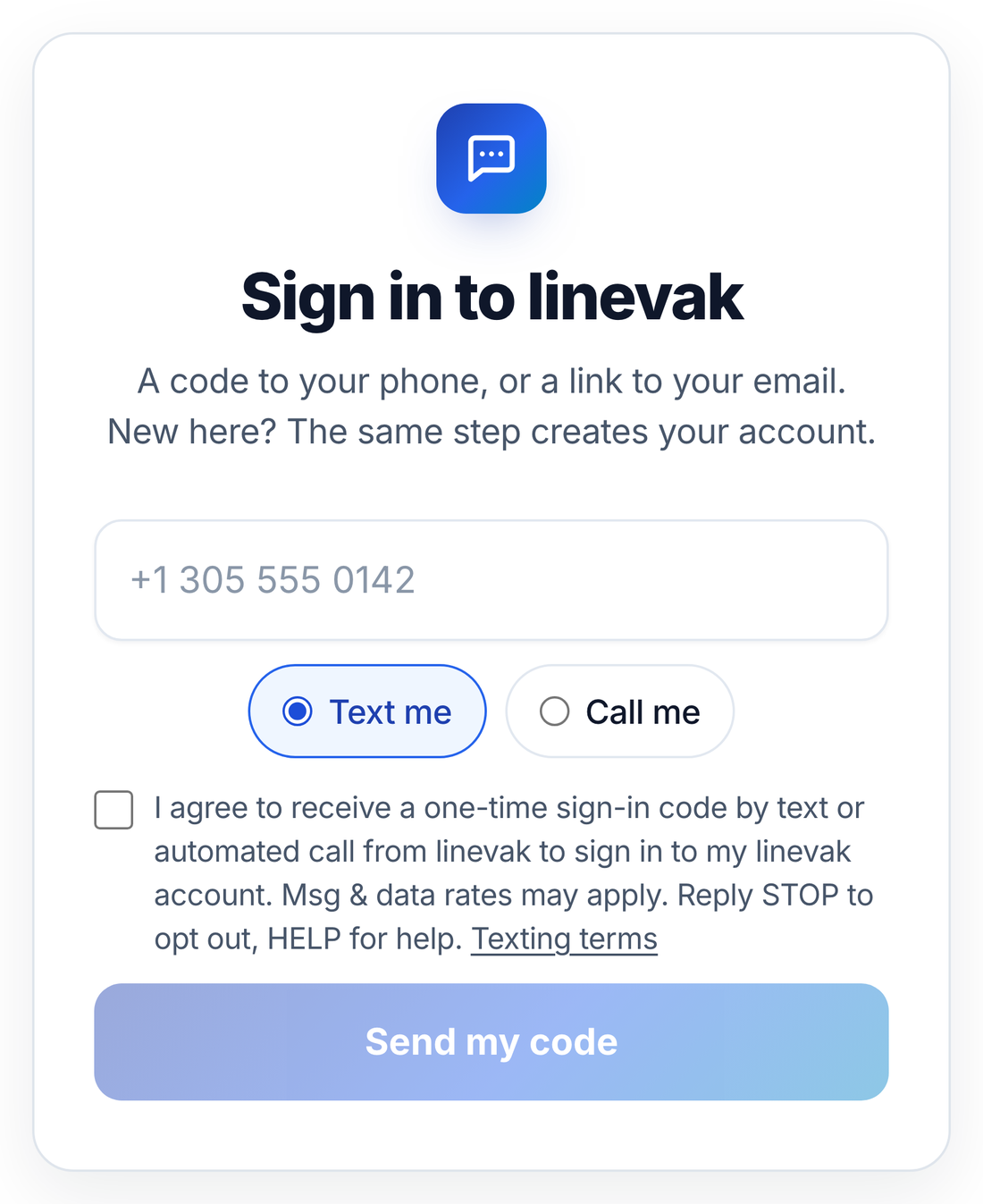
Agreeing to texts is not a condition of any purchase, and email sign-in is always offered as another way in.
Notifications from our apps (second number)
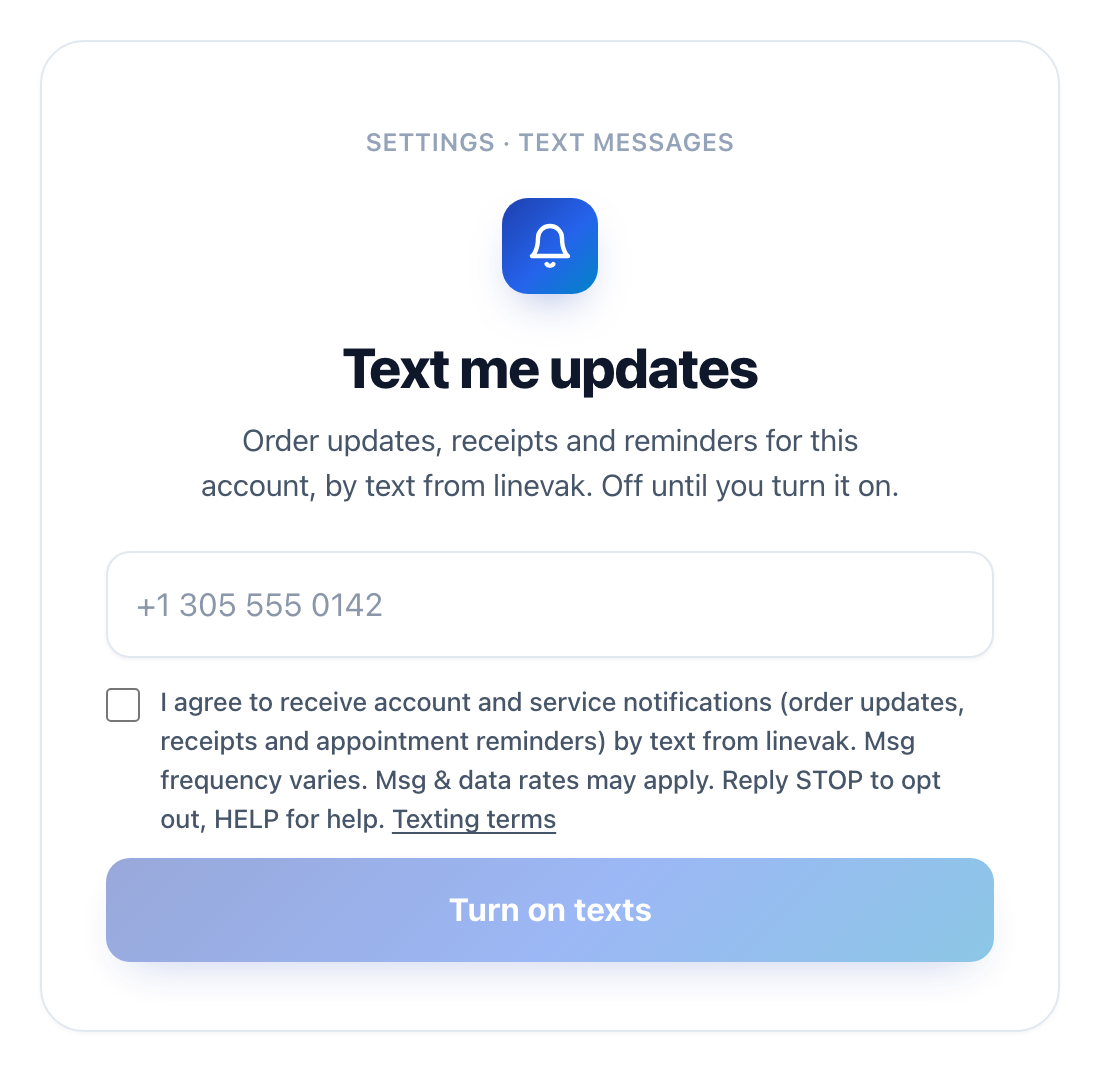
Parent Vertical LLC's own apps can also text you account and service notifications: order updates, receipts and appointment reminders. These come from a second linevak number and are off until you turn them on, in that app's Settings. You enter your own mobile number and tick a separate, unticked linevak box for notifications. This is the step, as it appears in our apps:
What we send and how often
- Sign-in codes — a one-time code to get into your account in the app you are using, sent only when you ask for it.
- Codes by WhatsApp — if you choose it, the same code can arrive as a WhatsApp message from linevak's verified WhatsApp account. Same consent, same rules.
- Codes by automated call — if you choose it, or a text doesn't arrive, the same code can be read to you in a short automated call. Same consent, same rules.
- Account and service notifications — from a second number, only after you turn them on in an app's Settings: order updates, receipts and appointment reminders. Message frequency varies with your activity.
For sign-in codes, message frequency depends on you: one text each time you request a code. We do not send marketing, promotions or recurring messages. The first text a number receives from us also says that message and data rates may apply and how to get help.
Sample messages
How to stop (opt out)
Reply STOP to any message. You will get one confirmation and no more texts from linevak to that number, for any app. Reply START to opt back in. Reply HELP for help, or email hello@linevak.com. The words UNSUBSCRIBE, CANCEL, END and QUIT also work.
Costs
Message and data rates may apply, depending on your mobile carrier and plan. linevak does not charge you for these messages. Carriers are not liable for delayed or undelivered messages.
Your privacy
Your mobile number is used only to send the messages described on this page. No mobile information will be sold or shared with third parties for promotional or marketing purposes. Consent to receive texts is not shared with anyone. See our Privacy Policy and Terms.
Contact
Parent Vertical LLC · 30 N Gould St, Ste N, Sheridan, WY 82801, USA · hello@linevak.com
Política de mensajes de texto (SMS)
Última actualización: 1 de octubre de 2026 · Parent Vertical LLC
Quién envía estos mensajes
linevak es un servicio de mensajes de texto operado por Parent Vertical LLC. linevak envía códigos de acceso de un solo uso para entrar en linevak.com y, desde un segundo número, avisos de tu cuenta y del servicio de las apps de Parent Vertical LLC cuando tú los enciendes. Cada mensaje empieza con "linevak:" y dice para qué es el código, para que siempre sepas de quién viene.
Cómo aceptas recibir mensajes
Aceptas en la página de acceso de linevak, linevak.com/start: escribes tu propio número de celular, eliges mensaje o llamada, marcas la casilla de linevak aceptando recibir un código de acceso de un solo uso y tocas el botón para enviarlo. La casilla nunca viene marcada, cubre solo los códigos de acceso y es aparte de cualquier otro término que aceptes. Así se ve hoy:
Aceptar mensajes no es condición para ninguna compra, y siempre se ofrece entrar con el correo.
Avisos de nuestras apps (segundo número)
Las apps de Parent Vertical LLC también pueden enviarte avisos de tu cuenta y del servicio: estado de pedidos, recibos y recordatorios de citas. Salen de un segundo número de linevak y están apagados hasta que tú los enciendes en los Ajustes de esa app. Escribes tu propio número de celular y marcas una casilla aparte de linevak, sin marcar, para los avisos. Así se ve ese paso en nuestras apps:
Qué enviamos y con qué frecuencia
- Códigos de acceso: un código de un solo uso para entrar a tu cuenta, solo cuando lo pides.
- Códigos por WhatsApp: si lo eliges, el mismo código puede llegar como mensaje de WhatsApp desde la cuenta verificada de linevak. El mismo permiso, las mismas reglas.
- Códigos por llamada automática: si lo eliges, o si un mensaje no llega, el mismo código se te puede leer en una llamada corta. El mismo permiso, las mismas reglas.
- Avisos de tu cuenta y del servicio: desde un segundo número, solo después de encenderlos en los Ajustes de una app: estado de pedidos, recibos y recordatorios de citas. La frecuencia depende de tu actividad.
Para los códigos, la frecuencia depende de ti: un mensaje cada vez que pides un código. No enviamos publicidad, promociones ni mensajes recurrentes. El primer mensaje que recibe un número también indica que pueden aplicarse cargos y cómo pedir ayuda.
Mensajes de ejemplo
Los mensajes llegan en inglés, tal como se ven abajo.
Cómo dejar de recibirlos
Responde STOP a cualquier mensaje. Recibirás una confirmación y ningún mensaje más de linevak a ese número, desde ninguna app. Responde START para volver a activarlos. Responde HELP para ayuda, o escribe a hello@linevak.com. También funcionan UNSUBSCRIBE, CANCEL, END y QUIT.
Costos
Pueden aplicarse cargos por mensajes y datos según tu compañía y tu plan. linevak no te cobra por estos mensajes. Las compañías telefónicas no son responsables de mensajes retrasados o no entregados.
Tu privacidad
Tu número se usa solo para enviarte los mensajes descritos aquí. No vendemos ni compartimos información móvil con terceros para fines promocionales o de marketing. Tu consentimiento para recibir mensajes no se comparte con nadie. Lee nuestra Política de privacidad y los Términos (en inglés).
Contacto
Parent Vertical LLC · 30 N Gould St, Ste N, Sheridan, WY 82801, EE. UU. · hello@linevak.com